detached HEAD is a common situation, sometimes useful, sometimes dangerous. It doesn’t point to any branches, so it will be cleaned by git.
The current commit history is as follows:
1 | $ git log --oneline --all --graph |
detached HEAD is a common situation, sometimes useful, sometimes dangerous. It doesn’t point to any branches, so it will be cleaned by git.
The current commit history is as follows:
1 | $ git log --oneline --all --graph |
.git directory acts a major role in git VCS. We can do local verson management directly depended on .git directory. I will parse .git in current topic.
First, I created a project and managed it through git, its directory tree is as follows:
1 | . |
We can enter command interface via the following ways.
init 3 with root. init run at runlevel 3.
init is the first process, it commonly locates on /sbin/init, if kernel can’t find init, it will try to run /bin/sh, if the operation fails , the OS will fail to start successfully.
init has 7 runlevels, we can check the default runlevel and runlevels in /etc/inittab. As follows:
1 | # Default runlevel. The runlevels used are: |
在使用 Ubuntu 的时候,有时候会遇到卡死的问题,然后电脑完全不能使用。这时候怎么办呢,我通常是通过如下两种方式进行处理:
Kill process当我们明确知道什么进程导致系统卡死的时候,譬如文件管理器,我们可以通过如下两种方式进入字符终端找到假死的进程然后 kill 掉。
Ctrl + Alt + F1 进入,Ctrl + Alt + F7 回到 UI 。ssh user@ip 远程登入。杀死进程的方式,我常用的有三种,如下:
Top 或者 htop 找到造成假死的进程并 kill。1 | ps -A |grep nautilus # 查看文件管理器的 PID |
Log out注销桌面重新登录:
1 | sudo pkill Xorg |
Git has always been a must-have skill for developers, I will submize a series of blogs related to it, although I don’t know too much about git now.
Pro Git is the best guide of git, I need to read it when I have plenty of time so that I can check for gaps.
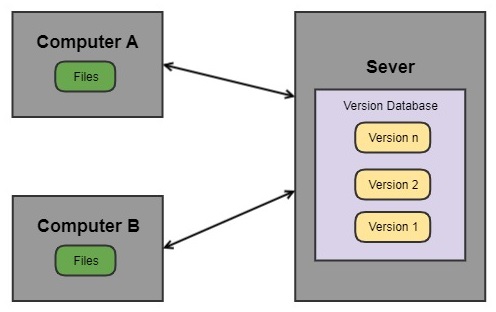
Central VCS mainly includes SVN and CVS, its newwork architecture is client-server.
Title: Remove Element.
Solution: Java.
I found a usage of “repo init … –reference” this week, I want to know more, so I read Android Repo Mirroring this week.
This article explains “repo mirroring” in a simple and clear way through examples.
Title: Valid Parentheses
Solution: Python
I read How to Read an Academic Article this week. It teaches me to read academic article by sharing handout. It simply summarizes the method of fast reading, a lot of them maybe be a cliche, but the summary is very helpful.